Rainbuvvy Co., Ltd.
 english
 français
 Deutsch
 Italiano
 Русский
 Español
 português
 Nederlandse
 ελληνικά
 日本語
日本語
 한국
한국
 العربية
 हिन्दी
 Türkçe
 indonesia
 tiếng Việt
 ไทย
ไทย
 বাংলা
বাংলা
 فارسی
فارسی
 polski

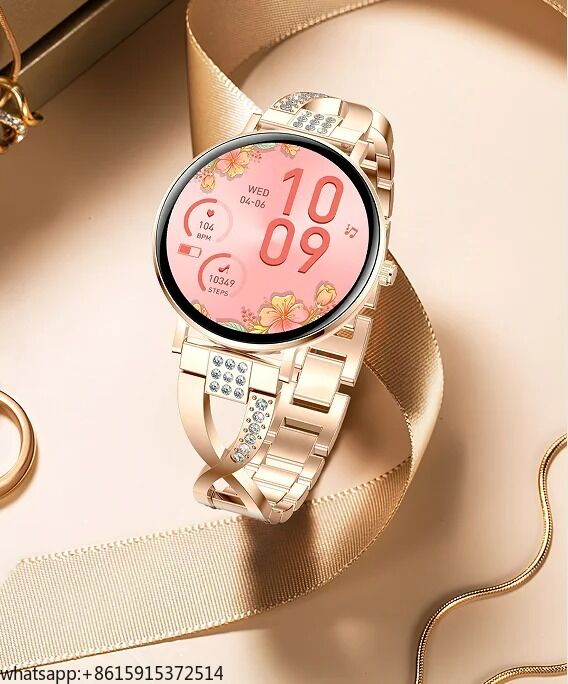
|
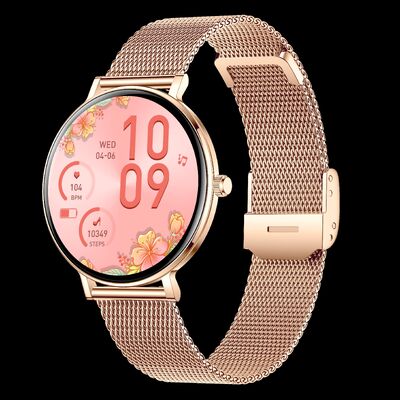
| 브랜드 이름: | Rainbuvvy |
| 모델 번호: | I232 |
| MOQ: | 100개 |
| 가격: | USD 28 /PC |
| 지불 조건: | L/C, D/A, D/P, T/T, 서부 동맹 |
| 공급 능력: | 5 일 당 100pc |
| I232 사양 | ||
| 하드웨어 카테고리 | 설명 | |
| 메인 칩 | RTL8763EWE | |
| 플래시 | 128M | |
| BT | BLE5.0/BT5.3 | |
| 가속도계 | STK8321 | |
| 디스플레이 | 1.32AMOLED 해상도 466 * 466 | |
| 터치 | 풀 터치 COF, 터치 IC: Hai Li Chuang CST820 | |
| 물리 버튼 | 지원 (1 버튼) | |
| 혼 | 지원 (임피던스 8옴, 최대 1W MAX) | |
| MIC (마이크) | 지원 (감도 42DB+/-3DB) | |
| 모터 | 지원 (전압 범위 1.3V-2.8V, 시작 전압 1.3V MAX, 정격 전압: 1.8V) | |
| 손전등 | 지원 | |
| 심박수 | Tianyi Hexin 3602 | |
| 배터리 | 정격 전압 3.8V, 충전 차단 전압 4.25V, 200mA | |
| 충전 관리 | 충전 전류 일반값 120mA | |
| 충전기 사양 | 5V (전류 ≥ 0.5A) 최대 입력 내압 6.5V | |
| 기능 | 기능 세부 정보 | 설명 |
| BT 이름 | BT 이름 | 팔찌 링크에 BT 이름이 표시되며, 17자 이하입니다. |
| 부팅 | 버튼 켜기 | 시계 측면 버튼을 길게 눌러 켜기 |
| 부팅 애니메이션 | 시작 애니메이션 (HELLO) 표시 | |
| 종료 | 활성 종료 | 시계 측면 키 길게 누르기 - 시스템 작동 - 종료 |
| 설정-시스템 작업-종료 | ||
| 저전력 종료 | 전력이 너무 낮을 때 자동 종료 | |
| 종료 애니메이션 | 시작 애니메이션 (GOODBYE) 표시 | |
| 다시 시작 | 장치 (소프트웨어 재부팅) | 활성 재시작을 위한 장치 제어 지원 |
| "화면 시계" | "화면 시계" | "화면 시계": 디지털 시계 및 포인터 시계; AM 화면만 열기 지원 |
| 바인딩 | QR 코드 연결 | 애플리케이션 QR 코드 및 장치 바인딩 QR 코드 다운로드 지원 |
| BT 스캔 바인딩 | BT 스캔 목록에서 해당 BT 이름 바인딩 클릭 | |
| 바인딩 해제 | 재설정 (공장 초기화) | 장치 측에서 바인딩 해제 시작, 공장 복원 후 시계 재시작 모든 데이터 지움 (푸시 다이얼, 스포츠 푸시, 게임 푸시 제외) |
| 바인딩 해제 | 앱 측에서 바인딩 해제 시작, 장치는 계속 BT 신호를 보냅니다. BT 스캔을 통해 장치를 다시 바인딩할 수 있습니다. 바인딩할 수 없으면 마지막으로 바인딩된 시계의 휴대폰 설정으로 이동하여 연결을 지우고 다시 연결하십시오. | |
| 연결 | 자동 재연결 | 장치는 하나의 휴대폰에만 바인딩될 수 있습니다. |
| 데이터 동기화 | 활성 동기화 | 사용자가 앱에서 데이터를 적극적으로 동기화 |
| OTA 업그레이드 | 사전 업그레이드 | 펌웨어 업그레이드 (팔찌 측 전력이 30% 미만일 때, APP는 업그레이드 및 관련 푸시 작업을 지원하지 않습니다 (참고: 원래 업그레이드 도구를 사용하는 경우 이러한 제한이 없습니다)) |
| 제스처 | 손목을 들어 화면 켜기 & 손목을 내려 화면 끄기 | 손목을 들면 화면이 자동으로 켜지고, 손목을 내리면 화면이 자동으로 꺼집니다. APP에서 손목을 들어 화면을 켜거나 끄는지 설정할 수 있습니다. |
| 전력 | 전력 측정 | 배터리 전력은 10개의 동일한 부분으로 표시되며, 전력 백분율은 표시되지 않습니다. |
| 키-상호 작용 정의 | A 키 | Tuobu 공개 버전 기능 정의: 1 버튼: 홈 페이지 다이얼에서 짧게 누르면 메뉴 스타일로 들어가고, 메뉴 스타일 인터페이스에서 두 번 클릭하면 스타일이 전환되며, 다른 페이지에서 짧게 누르면 홈 페이지로 돌아가고, 길게 누르면 종료 페이지가 나타납니다. 종료 상태에서 길게 누르면 부팅할 수 있습니다. |
| 화면 상호 작용 | 터치 | 위로 스와이프, 아래로 스와이프, 오른쪽으로 스와이프, 왼쪽으로 스와이프, 길게 누르기, 클릭 |
| 위로 스와이프 | 메인 다이얼에서 메시지 기능 위로 스와이프 | |
| 아래로 스와이프 | 메인 다이얼에서 바로가기 메뉴 기능 아래로 스와이프 | |
| 왼쪽 스와이프 | 사이드바 | |
| 오른쪽 스와이프 | 메인 다이얼에서 첫 번째 레벨 메뉴 기능 (일일 데이터, 심박수, 수면, 날씨, 음악, 운동, 혈중 산소)으로 오른쪽 스와이프 | |
| 메인 다이얼 길게 누르기 | 메인 다이얼을 길게 눌러 다이얼 썸네일로 들어가고 왼쪽 및 오른쪽으로 스와이프하여 다이얼을 전환합니다. 화면을 짧게 눌러 전환할 다이얼을 선택합니다. | |
| 다국어 | 시계 언어 | 제품 펌웨어 언어는 플래시 크기에 따라 선택 가능: 영어, 독일어, 프랑스어, 이탈리아어, 스페인어, 폴란드어, 러시아어, 포르투갈어, 베트남어, 아랍어, 히브리어, 태국어, 크로아티아어, 터키어, 체코어, 네덜란드어, 인도네시아어, 말레이시아어, 핀란드어, 그리스어, 루마니아어, 힌디어, 페르시아어 (해상도 466*466, 410*502는 중국어 번체, 일본어, 한국어를 지원하지 않음) |
| APP 언어 | APP 언어: 영어, 중국어 간체, 중국어 번체, 독일어, 프랑스어, 아랍어, 체코어, 그리스어, 스페인어, 일본어, 페르시아어, 이탈리아어, 한국어, 네덜란드어, 폴란드어, 포르투갈어, 러시아어, 핀란드어, 스웨덴어, 태국어, 헝가리어, 슬로바키아어, 크로아티아어, 알바니아어, 터키어, 우크라이나어, 힌디어, 베트남어, | |
| APP 다이얼 | 온라인 다이얼 | 다이얼 마켓을 위한 다이얼 동기화, 좋아하는 다이얼을 선택하여 시계 디스플레이로 동기화 |
| 앨범 다이얼 | 사용자는 자신의 사진을 업로드하여 다이얼 배경을 사용자 정의할 수 있습니다. | |
| 시계 내장 다이얼 | 시계 내장 다이얼 | 다이얼 사용자 정의 선택, 기본적으로 클라우드 다이얼 공간이 있으며, Sync Cloud Dial을 시계로 다운로드할 수 있습니다. |
| 모션 모드 | 로컬 운동 | 8+1 모드 (8가지 고정 스포츠 (걷기, 달리기, 등산, 사이클링, 줄넘기, 농구, 배드민턴, 축구) + 1 스포츠 푸시 위치 (요가)) |
| 스포츠 푸시 | APP를 통해 운동 모드 푸시, 100개 이상의 운동 푸시 지원 | |
| 스포츠 기록 | 데이터 저장 (최신 10개 항목 저장 (데이터 저장 조건이 충족되지 않으면 저장되지 않음)): 시간 날짜, 운동 유형, 지속 시간, 걸음 수, 거리, 칼로리, | |
| 위챗 스포츠 | 위챗 스포츠 | 1. 위챗 스포츠에 액세스하여 위챗 스포츠 앱릿에 들어갑니다. 액세스가 완료되면 "WeChat Sports Access Tutorial.pdf" 문서의 작업 자습서 세부 정보를 따르고, 팔찌 스포츠 데이터가 위챗 순위에 동기화됩니다. |
| 심박수 | 심박수 | 1. 홈 페이지의 심박수는 0이 아닌 값 + 심박수 페이지에 들어갈 때 마지막 측정 결과만 저장됩니다; 2. 24시간 심박수 히스토그램, 값은 APP가 자동 모니터링을 켠 후 모니터링된 데이터입니다. |
| 혈압 | 혈압 | 1. 홈 혈압은 0이 아닌 값 + 혈압 마지막 측정값만 페이지에 들어갈 때 표시됩니다; 2. 혈압 데이터는 최근 7회까지 기록할 수 있으며, 매회 최고 및 최저값이 기록됩니다. |
| 산소 | 산소 | 1. 홈 혈압은 0이 아닌 값 + 혈중 산소 마지막 측정값만 페이지에 들어갈 때 표시됩니다; 2. 혈압 데이터는 최근 7회까지 기록할 수 있으며, 매회 최고 및 최저값이 기록됩니다. 1) 실제 혈중 산소: 수동 감지만 지원하며, APP에서 시작하는 자동 모니터링 기능은 지원하지 않습니다; 2) 가짜 산소: 수동 감지 및 APP에서 시작하는 자동 모니터링 기능을 지원합니다. |
| 수면 | 수면 | 오전 8시 30분 이후에 깨어나면 기록이 중첩되지 않습니다. 모니터링 시간: 21:30-12:00, 밤에 착용한 수면 데이터 (총 수면 시간, 깊은 얕은 수면 시간) 및 7일간의 수면 데이터 (수면 시간) |
| 걸음 수 | 걸음 수 | 분당 걸음 수를 모니터링하여 기록 |
| 칼로리 | 칼로리 | 분당 칼로리를 모니터링하여 기록 |
| 거리 | 거리 | 분당 거리를 모니터링하여 기록 |
| 여성 | 여성 | 1) 여성 건강 기능 페이지는 다음과 같습니다: 안전 기간, 배란 기간, 배란일, 생리 기간, 임신 기간 2) APP에서 사용자의 성별이 여성으로 설정되고 관련 설정 작업이 수행된 경우에만 이 기능을 켤 수 있습니다. 그렇지 않으면 이 기능이 켜지지 않았다고 표시됩니다. |
| 호흡 훈련 | 호흡 훈련 | 1. 시간 길이는 1분 및 2분으로 나뉩니다; 2. 호흡 훈련 측정을 켜면 동시에 심박수 값을 측정하고, 종료 시 심박수 값을 측정합니다. |
| 정보 저장 | 정보 저장 | 최신 15개의 메시지 내용을 유지하며, 초과 시 가장 오래된 메시지를 덮어씁니다. |
| 메시지 알림 | 메시지 알림 | 1. 메시지 알림: 화면 밝기 & 진동 2. 애플리케이션 알림: 수신 전화, 문자 메시지, 이메일, 위챗, QQ, 페이스북, X, 왓츠앱, 링크드인, 인스타그램, 메신저, 스냅챗, 라인, 바이버, 스카이프, 기타 애플리케이션. |
| 다이얼링 | 다이얼링 | 다이얼링 기능: 최대 17자리 숫자 입력 지원, 지역 번호 다이얼링 증가 지원 |
| 자주 사용하는 연락처 | 자주 사용하는 연락처 | 최대 10개의 자주 사용하는 연락처를 추가할 수 있습니다. (앱 내 삭제만 지원) 앱에서 연락처를 추가하면 시계가 연결될 때 연락처가 자동으로 동기화됩니다. |
| 통화 기록 | 통화 기록 | 최대 10개의 통화 기록, 로컬 통화 기록 삭제는 지원되지 않음 |
| 음성 비서 | 음성 비서 | 새로운 음성 비서 로직을 가져와 시스템 자체 음성 비서 웨이크업 지원 |
| 분할 화면 | 분할 화면 | 메인 다이얼에서 오른쪽으로 스와이프하면 분할 화면이 표시되고, 시간, BT 스위치, 날씨, 최근에 켠 4가지 애플리케이션 기능이 표시됩니다. |
| 구성 요소 | 구성 요소 편집 | 첫 번째 레벨 메뉴 목록 (일일 데이터, 심박수, 수면, 날씨, 음악, 운동, 혈중 산소) 편집을 허용하는 기능 |
| 스톱워치 | 스톱워치 | 1. 스톱워치는 백그라운드에서 실행될 수 없습니다. 2. 스톱워치 미터 수는 99개입니다. |
| 카운트다운 | 카운트다운 | 1. 카운트다운은 백그라운드에서 실행될 수 없으며, 페이지를 나가기 전에 카운트다운을 일시 중지해야 합니다. 2. 카운트다운이 0이 되면 진동만 합니다. |
| 휴대폰 찾기 | 휴대폰 찾기 | 시계에서 휴대폰 찾기 클릭, 휴대폰 진동/벨소리 알림 |
| 팔찌 찾기 | 팔찌 찾기 | APP에서 "UI 밝게 하기 + 진동"으로 팔찌 검색 시작, 3번 진동 |
| 음악 | 음악 제어 | 위아래 곡, 재생 일시 중지 (재생 일시 중지 동일 버튼), 볼륨 조절 (볼륨 진행률 표시줄은 지원되지 않음), 곡 제목 |
| 밝기 조절 | 밝기 조절 정의 | 1. 형식 표시를 사용하고 밝기를 5단계로 조절합니다. 2. 기본값은 3단계입니다. |
| 화면 밝기 지속 시간 | 화면 밝기 설정 | 1. 화면 조명 시간은 5단계: 5초, 10초, 15초, 20초, 30초입니다. 2. 기본값은 10초입니다. |
| 손목 올림 화면 밝기 설정 | 1. 손목을 들어 화면을 켜는 시간은 3단계: 2초, 3초, 4초, 5초, 6초입니다. 2. 기본값은 5초입니다. |
|
| 진동 설정 | 진동 강도 설정 | 1. 진동 강도 기어: 없음, 약함, 강함 2. 기본값은 약함입니다. |
| 방해 금지 모드 | 방해 금지 모드 | 방해 금지 모드 |
| 절전 모드 | 절전 모드 증가 | 절전 모드 증가 |
| 메인 메뉴 스타일 | 메인 메뉴 스타일 | 8763 표준에서 가져온 네 가지 메뉴 스타일: 9칸 그리드, 고정점 링, 반원, 목록 (기본 목록 스타일) 8773 표준에서 가져온 여섯 가지 메뉴 스타일: 9칸 그리드, 고정점 링, 반원, 목록, 큐브, 육면체 열 (기본 열 스타일) |
| 사진 찍기 흔들기 | 사진 찍기 흔들기 | APP에서 "사진 찍기 흔들기" 인터페이스를 열면 시계를 흔들어 사진 기능을 응답합니다. |
| 계산기 | 계산기 | 1. 현재는 단일 단계 연산만 지원하며 다단계 연산은 지원하지 않습니다. 숫자 입력은 7자리 상한선입니다 (음수 입력은 처리되지 않음). 계산 결과는 8자리 상한선입니다. 결과가 계산된 값을 초과하면 "--------"를 사용하여 계산할 수 없음을 표시합니다. 2. 삭제 버튼을 길게 누르면 현재 데이터 및 버튼 상태가 모두 지워집니다. |
| 달력 | 달력 | 스타일은 현재 연월일을 표시하고 아래로 스와이프하면 달력이 표시됩니다. |
| 알람 시계 | 알람 시계 | 앱을 통해 알람을 설정하고, 설정이 성공하면 시계 측에서 알람 켜기/끄기 상태를 설정할 수 있습니다. |
| 단위 | 단위 | 거리: 미터법 (기본값)/영국식 시간: 12시간/24시간 (기본값) 온도: 화씨/섭씨 (기본값) |
| 날씨 | 단일 일 날씨 (일 날씨) | 당일 날씨 데이터 (온도, 날씨 상태)만 표시됩니다. |
| 게임 | 게임 | 2048 & 레이싱 게임 |
| 명함 | 명함 | 지원: QQ, 위챗, 페이스북, 왓츠앱, 트위터, 인스타그램, 라인, 스카이프, 링크드인, 전화, 이메일 |
| 수집가 코드 | 수집가 코드 | 지원: QQ, 위챗, 알리페이, 페이팔, 페이팀, 폰페이, GPay, BHIM |


